Set binding constraints
To add additional constraints on your study that are not already implemented in Antares, you can specify some binding constraints. It is a linear combination of generation on clusters or on transmission in links that are bounded with a constant such as for each step \(t\):
where:
- \(w_i\) is a scalar weight
- \(\text{bounded by}\) corresponds to the operators \(=\), \(<\), \(>\) or \(\neq\)
- \(o_i\) is an offset in the time step
- \(t\) corresponds to the considered time step which can be hourly, daily or weekly
- \(c_t\) is the right hand side of the constraint a scalar
- \(a_{t - o_i}\) corresponds to the cluster or link term
Left hand side
First, you need to create a new binding constraint in the Modeling > Binding constraints tab by clicking on the Add button in the left panel.
Then, give it a name, a type (whether this constraint is on hourly, daily or weekly time step) and a bound.
You will then have a similar view:
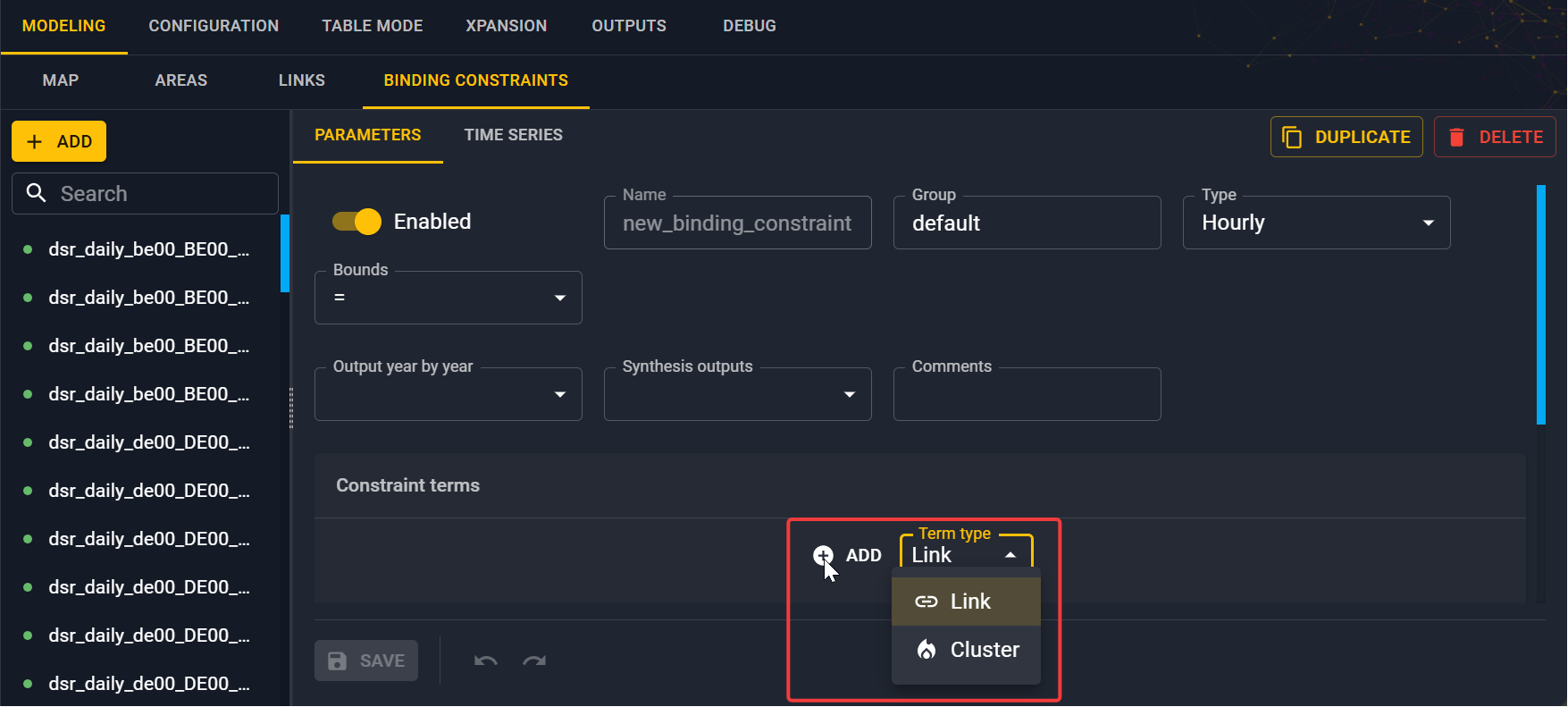
You have to create your linear combination corresponding to the left hand side of the constraint. Set the weights, term (link or cluster), time offset.
By choosing a link term, you want to constraint the transmission of the link between two areas (directional link). By choosing a cluster term, you want to contraint the generation of a cluster inside an area.
Right hand side
The right hand side of the constraint consisting of a column of values \((c_t)\). You can add these in the Time series tab.
Note
The length of this column depends on the time step of the binding constraints.
Info
Check the reference section of the binding constraints for more information