Xpansion settings
Optimization
UC type
enum The unit-commitment type parameter specifies the simulation mode used by Antares to evaluate the operating costs of the electrical system:
-
expansion_fast: Deactivate the flexibility constraints of the thermal units (Pmin constraints and minimum up and down times), and don't take into account either the start-up costs or the impact of the day-ahead reserve. -
expansion_accurate: The unit-commitment variables are relaxed. The flexibility constraints of the thermal units as well as the start-up costs are taken into account.
Master problem
int The master parameter provides information on how integer variables are taken into account in the Antares Xpansion master problem.
-
relaxed: The integer variables are relaxed, and the level constraints of the investment candidates (cf. unit-size) will not be necessarily respected. The master problem is linear. -
integer: The investment problem is solved by taking into account unit-size constraints of the candidates. The master problem is a MILP (Mixed-Integer Linear Program).
For problems with several investment candidates with large max-units, using master = relaxed can accelerate the Antares-Xpansion algorithm very significantly.
Max iteration count
int Maximum number of iterations for the Benders decomposition algorithm. Once this number of iterations is reached, the Antares Xpansion algorithm ends, regardless of the quality of the solution.
Absolute optimality gap (€)
float The optimality gap defined in euros, is the tolerance for the Antares Xpansion algorithm.
At each iteration, the algorithm computes upper and lower bounds on the optimal
cost. The algorithm stops as soon as the quantity best_upper_bound -
best_lower_bound falls below optimality_gap. The solution returned by the
algorithm has a cost equal to best_upper_bound, which is guaranteed to be
within optimality_gap euros of the optimal cost.
- If
optimality_gap = 0, Antares-Xpansion will continue its search until the optimal solution of the investment problem is found. - If
optimality_gap > 0, the search will stop as soon asbest_upper_bound - best_lower_bound < optimality_gap.
Here is an illustration of the optimality gap and the set of solutions that can be returned by the package when the gap is strictly positive.
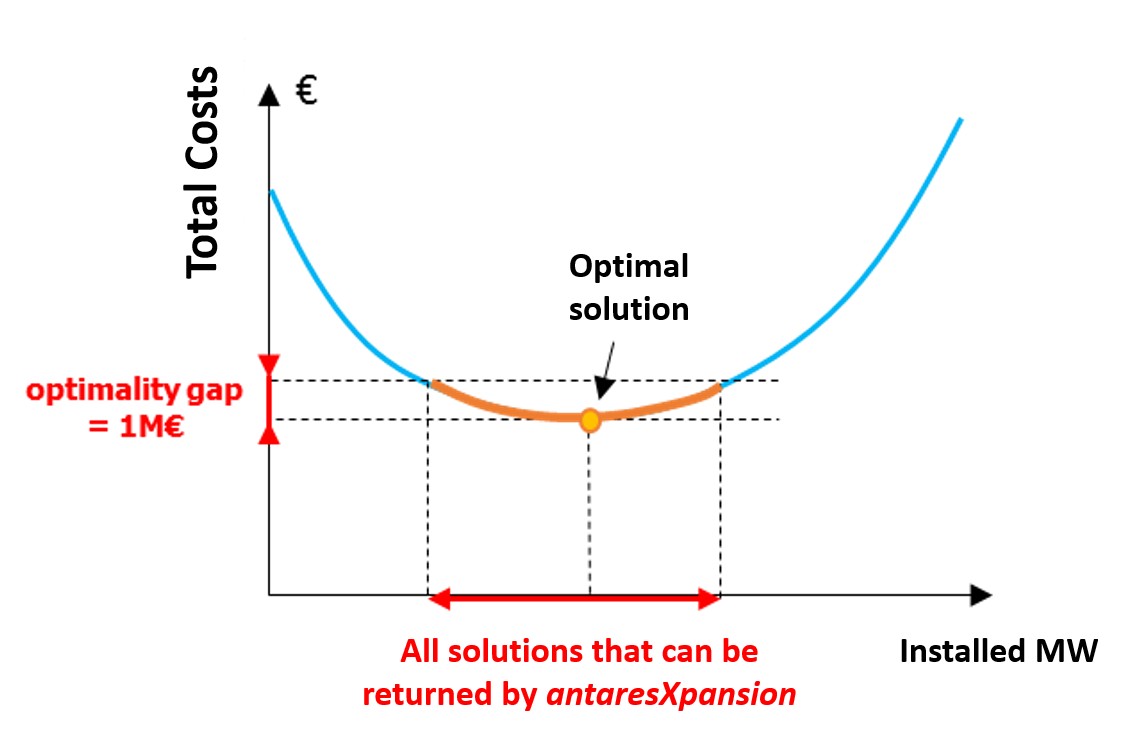
The interest of a strictly positive optimality_gap is that it speeds up the
search by stopping as soon as a "good" solution is found.
The interpretation of this stopping criterion is not always obvious. It certainly guarantees that a solution found by the algorithm has a cost that is close to the optimum, but it does not provide any information on the distance (in MW) between the installed capacities of this solution and those of the optimal solution: if the cost function is relatively flat around the optimum, solutions whose costs are close may have significantly different installed capacities.
Which settings should I use for the optimality_gap?
-
I have to run several expansion optimizations of different variants of a study and compare them. In that case, if the optimal solutions are not returned by the package, the comparison of several variants can be tricky. The inaccuracy of the method might indeed be of the same order of magnitude as the changes brought by the input variations. It is therefore advised to be as closed as possible from the optimum of the expansion problem. To do so, we advise to set the
optimality_gapto zero. -
I am building one consistent generation/transmission scenario. As the optimal solution is not more realistic than an approximate solution of the modelled expansion problem, the settings can be less constraining with an
optimality_gapof a few million euros.
Relative optimality gap
float Tolerance on the relative gap for the Antares Xpansion algorithm.
At each iteration, the algorithm computes upper and lower bounds on the optimal
cost. The algorithm stops as soon as the quantity
(best_upper_bound - best_lower_bound) / max(|best_upper_bound|, |best_lower_bound|)
falls below relative_gap. For a relative gap \(\alpha\), the cost of the
solution returned by the algorithm satisfies:
Note
The algorithm stops as soon as the first criterion among optimality_gap
and relative_gap is met. Keep in mind that if either parameter is not
specified by the user, the default value is used.
Relaxed optimality gap
float
The relaxed_optimality_gap parameter only has effect when master = integer.
In this case, the master problem is relaxed in the first iterations.
The relaxed_optimality_gap is the threshold from which to switch back from
the relaxed to the integer master formulation.
In the first iterations, the algorithm computes upper and lower bounds on the
optimal cost of the relaxed master problem. The algorithm switches to the
integer formulation as soon as the quantity
(best_upper_bound - best_lower_bound) / best_upper_bound falls below
relaxed_optimality_gap. For the subsequent iterations, the best upper bound
is reset to \(+\infty\) as the solutions of the relaxed problem are not feasible
for the integer formulation.
Solver
enum
Solver that is used to solve the master and the subproblems in the
benders decomposition.
The user can set Cbc which stands for the COIN-OR optimization suite.
Depending on whether the problem has integer variables, Antares Xpansion
calls either the linear solver (Clp) or
the MILP solver (Cbc) of the COIN-OR
optimization suite.
Note
In Antares Xpansion, the subproblems are always linear. If master = relaxed,
the master problem is linear as well, whereas if master = integer, the
master problem is a MILP.
Separation parameter
float Defines the step size for the in-out separation in \([0,1]\). If \(x_{in}\) is the current best feasible solution and \(x_{out}\) is the master solution at the current iteration, the investment in the subproblems is set to
The in-out stabilisation technique is used in order to speed up the Benders
decomposition. When separation_parameter < 1, it is necessary to relax the
master problem in the first iterations as the cut point \(x_{cut}\) is a
convex combination of the best feasible solution and of the solution of
the master problem. In the case where master = integer, the algorithm
proceeds as follows:
- Solve the first iterations with the relaxed formulation using the in-out stabilisation technique
- Once the gap is sufficiently small (see
relaxed_optimality_gap), switch back to the integer formulation and set backseparation_parameter = 1i.e. use the classical Benders algorithm.
Time limit (h)
int Maximum allowed time in seconds for the execution of the Benders step of Antares Xpansion (i.e. the time of the initial Antares simulation and for the problem generation step is not accounted for). Once the timelimit is reached, the algorithm finishes the current Benders iteration - which can take several additional seconds or minutes - and terminates.
Batch size
int
This parameter specifies the number of subproblems per batch. If set to 0,
then all subproblems are in the same batch. In this case, the classical
Benders is launched.
Log level
enum
Possible values: {0, 1, 2}, specifying the solver's log severity. Default
value: 0.
Logs can be printed both in the console and in a file. There are 3 types of logs:
- Operational: Displays progress information for the investment on candidates and costs,
- Benders: Displays information on the progress of the Benders algorithm,
- Solver: Logs of the solver called for the resolution of each master or subproblem.
The table below details the behavior depending on the log_level.
| Operational | Benders | Solver | |
|---|---|---|---|
| File | Always (reportbenders.txt) |
Always (benders_solver.log) |
2 (solver_log_proc_<proc_num>.txt) |
| Console | 0 | >= 1 | Never |
Cut coefficient tolerance
float Tolerance under which cuts coefficients and right-hand sides are considered to be zero. This allows to have "clean" cuts in the master problem, in order to avoid numerical issues. This should be less than 1.
Master solution tolerance
float
Control the tolerance used when rounding the solution variables of the
master problem. It allows to restore feasibilities of master solutions (as
the solver may return slightly infeasible values). Also in the stabilized
version (i.e. when separation_parameter < 1), if x_cut is within this
tolerance of a bound, it will be rounded to this bound before fixing the
subproblems candidates values. This helps to avoid numerical artifacts.
Modeling add-ons
Yearly weight
string
The parameter yearly-weights allows to assume that the Monte Carlo years
simulated in the Antares study are not equally probable. The most
representative years may be given greater weight than those that are less
representative. The yearly-weights parameter defines a file that stores a
vector \(\left( \omega_{1},\ldots,\omega_{n} \right)\), with \(n\) the number
of Monte-Carlo years in the study, which is used to evaluate the expected
production cost:
with \(\text{cost}_{i}\) the production cost of the \(i\)-th Monte Carlo jaar and \(\omega_i\) the associated weigth.
The input file must contain a single column with as many numerical values as there are Monte-Carlo years in the Antares study. The value of the \(i\)-th row is the weight \(\omega_i\) of the \(i\)-th Monte Carlo year.
Note
You can import the weights file in the Xpansion > Weights tab.
If the yearly-weights parameter is not used, the Monte-Carlo years of the
Antares study are considered to be equally-weighted.
Note
The yearly-weights parameter must be set in line with the Antares
study playlist by the user: years with zero weights must be removed from
the Antares study playlist in order not to be simulated unnecessarily.
Additional constraints
string Name of the additional constraint file. It allows to impose linear constraints between the invested capacities of investment candidates. These linear constraints will be added to the master problem.
Note
You can import it in the Xpansion > Constraints tab.
The format of the file is inspired from binding constraints.
[1]                     # index
name = additional_c2    # Constraint name, unique and without any special symbols or space
semibase = 3            # Numeric coefficient of the variables
peak = 2                # Numeric coefficient of the variables
sign = less_or_equal    # Sign is less_or_equal, equal, or greater_or_equal
rhs = 300               # rhs is numeric and is the second term of the constraint
Here, the corresponding constraint equation is: \(3 \times \texttt{semibase} + 2 \times \texttt{peak} \leq 300\).
A constraint in the additional-constraints is defined with the following
parameters:
-
name: string. The constraint name must be unique and must not contain any special symbols or space. -
<investment-candidate-name>: float. Coefficient of the left-hand side variable corresponding to<investment-candidate-name>. -
sign: Eitherless_or_equal,equalorgreater_or_equal. Defines the relationship between the left-hand side and right-hand side of the constraint. -
rhs: float. Right-hand side of the constraint.
The user can also optionally use binary constraints to represent, for example,
exclusion constraints. The [variable] section is optional and allows the
definition of optional variables linked to investment candidates for
exclusion constraints.
Warning
The use of binary variables is not recommended as it greatly increases the calculation time.
Antares Xpansion cannot invest in semibase and peak at the same time, but
it can invest in neither:
[variables]
semibase = bin_semibase
peak = bin_peak
pv = bin_pv

[1]
name = additional_c1
bin_semibase = 1
bin_peak = 1
sign = less_or_equal
rhs = 1

[2]
name = additional_c2
semibase = 3
peak = 2
sign = less_or_equal
rhs = 300
The above constraints translate to:
- \(1 \times \texttt{bin_semibase} + 1 \times \texttt{bin_peak} \leq 1\)
- \(3 \times \texttt{semibase} + \texttt{peak} \leq 300\)
Sensitivity calculation
Max gap to optimum (€)
float Defines the maximum gap with the optimal solution that is allowed.
Compute CAPEX
bool Whether to solve CAPEX sensitivity problems (minimization and maximization).
Projections
string List of candidate names for which the projection of the set of \(\varepsilon\)-optimal solutions is computed. For each candidate, two problems are solved: minimization and maximization of the invested capacity.